


Indoor LED par lights have become an essential part of modern lighting solutions, offering versatility, energy efficiency, and a wide range of color options. As a leading indoor LED par light supplier, I understand the importance of being able to adjust the color of these lights to create the perfect ambiance for any space. In this blog post, I will share some tips and techniques on how to adjust the color of indoor LED par lights effectively.
Understanding the Basics of Color in LED Par Lights
Before we dive into the adjustment process, it's crucial to understand the basics of color in LED par lights. LED par lights typically use a combination of red, green, and blue (RGB) LEDs to create a spectrum of colors. By adjusting the intensity of each primary color, you can produce a virtually infinite range of hues. Some advanced models may also include additional colors such as amber, white, or ultraviolet (UV) to expand the color palette even further.
The color of an LED par light is often described using the concept of color temperature, measured in Kelvin (K). Lower color temperatures (around 2700K - 3000K) produce a warm, yellowish light similar to traditional incandescent bulbs, which is ideal for creating a cozy and inviting atmosphere. Higher color temperatures (5000K - 6500K) result in a cool, bluish - white light, which is suitable for task lighting or areas where a bright, energetic feel is desired.
Methods of Adjusting Color
1. Using a DMX Controller
A DMX (Digital Multiplex) controller is one of the most common and powerful ways to adjust the color of indoor LED par lights. DMX is a standard protocol used in the lighting industry to control multiple lighting fixtures simultaneously. Here's how you can use a DMX controller to adjust the color of your LED par lights:
- Connect the Lights: First, connect your LED par lights to the DMX controller using DMX cables. Make sure each light is properly addressed, which means assigning a unique DMX channel or range of channels to each fixture.
- Program the Controller: Once the lights are connected, you can use the DMX controller's interface to program the color settings. Most DMX controllers have a graphical user interface (GUI) that allows you to select the desired color by adjusting the intensity of the RGB channels. You can also create color scenes, fades, and chases to add dynamic effects to your lighting setup.
- Test and Fine - Tune: After programming the controller, test the lights to see if the colors are as desired. You may need to fine - tune the settings to achieve the perfect color balance.
For example, if you want to create a warm, orange - red color for a party atmosphere, you can increase the intensity of the red channel and slightly reduce the green and blue channels on the DMX controller.
2. Using a Remote Control
Many indoor LED par lights come with a remote control that allows you to adjust the color without the need for a DMX controller. Remote controls are usually more user - friendly and are suitable for small - scale applications or home use. Here's how to use a remote control to adjust the color:
- Power On the Lights: Make sure your LED par lights are powered on and in the correct mode to receive signals from the remote control.
- Select the Color Mode: Most remote controls have a button or a series of buttons to select different color modes, such as static color, color changing, or color cycling. Press the appropriate button to enter the desired mode.
- Adjust the Color: Once you are in the color - adjustment mode, you can use the up and down arrows or other dedicated color - adjustment buttons on the remote control to change the color. Some remote controls also allow you to adjust the color temperature, brightness, and speed of color changes.
For instance, if you want to set a soft blue color for a relaxing bedroom environment, you can use the color - selection buttons on the remote control to find the right shade of blue.
3. Using a Mobile App
With the advancement of technology, many indoor LED par lights can now be controlled using a mobile app. Mobile apps offer a convenient and intuitive way to adjust the color of your lights, especially when you want to control them from a distance or integrate them with other smart home devices. Here's how to use a mobile app to adjust the color:
- Download and Install the App: First, download the appropriate mobile app for your LED par lights from the app store. Make sure the app is compatible with your light model.
- Connect the Lights to the App: Follow the instructions in the app to connect your LED par lights to your smartphone or tablet via Wi - Fi or Bluetooth. This usually involves entering the Wi - Fi password or pairing the device with the lights.
- Adjust the Color: Once the lights are connected, you can use the app's interface to adjust the color. Most apps have a color wheel or sliders that allow you to select the desired color easily. You can also create custom color scenes, set timers, and control multiple lights at once.
For example, if you want to create a colorful lighting display for a special event, you can use the app to program a sequence of colors and effects.

Factors to Consider When Adjusting Color
1. The Purpose of the Space
The color of your indoor LED par lights should be chosen based on the purpose of the space. For example, in a living room, warm colors like red, orange, and yellow can create a cozy and inviting atmosphere, while in a study or a workspace, cool white light is more suitable for task lighting and concentration.
2. The Existing Decor
The color of the lights should also complement the existing decor of the space. If the room has a lot of warm - toned furniture and wall colors, warm - colored lights will enhance the overall aesthetic. On the other hand, if the decor is modern and minimalist with cool - toned colors, cool - white or blue - toned lights may be a better choice.
3. The Mood You Want to Create
Different colors can evoke different moods. Red is often associated with passion and excitement, while blue is linked to calmness and relaxation. Consider the mood you want to create in the space and choose the colors accordingly.
Our Product Recommendations
As an indoor LED par light supplier, we offer a wide range of high - quality products that are easy to adjust in terms of color. Here are some of our popular products:
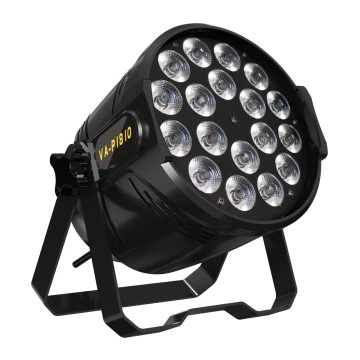
- 18PCS 10W 4 - in - 1 Full Color Par Light (Optional for 5/6 in 1): This product offers a full - color spectrum with the option to choose from 4 - in - 1, 5 - in - 1, or 6 - in - 1 color configurations. It can be easily controlled using a DMX controller, remote control, or a mobile app, allowing you to create a variety of lighting effects.
- 4x 50W LED COB Blinder Light: This powerful blinder light provides intense illumination and can be adjusted in terms of color and brightness. It is suitable for stage lighting, concerts, and other large - scale events.
- 2 - in - 1 Audience Light: This unique audience light combines two different lighting functions in one fixture. It offers adjustable color options to enhance the atmosphere in auditoriums, theaters, and other public spaces.
Contact Us for Procurement
If you are interested in purchasing our indoor LED par lights or have any questions about color adjustment or other lighting solutions, we encourage you to contact us for procurement and further discussion. Our team of experts is ready to assist you in finding the perfect lighting products for your needs.
References
- Lighting Handbook: Reference and Application, Ninth Edition, Illuminating Engineering Society of North America (IESNA).
- LED Lighting Technology: Principles and Applications, Second Edition, by Michael F. Schubert and Erik F. Schubert.


