


Hey there! I'm an indoor LED par light supplier, and I often get asked about how to connect multiple indoor LED par lights together. It might seem a bit tricky at first, but with the right know - how, it's actually pretty straightforward. In this blog, I'll walk you through the whole process step by step.
First things first, let's talk about why you might want to connect multiple LED par lights. Whether you're setting up a small home theater, a dance studio, or a professional event space, having multiple lights connected can create a more dynamic and engaging lighting effect. You can synchronize the colors, brightness, and patterns to match the mood of the event or the theme of the space.
Understanding Your Lights
Before you start connecting the lights, it's crucial to understand the type of indoor LED par lights you have. Different lights have different connection requirements. For example, some lights might use a DMX (Digital Multiplex) connection, while others could be connected via a simple daisy - chain method.

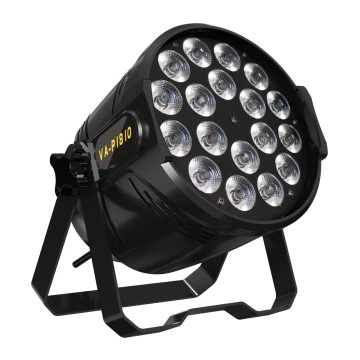
Let's take a look at a couple of our popular products. The 4x 50W LED COB Blinder Light is a high - power light that can be used for creating intense lighting effects. It typically supports DMX control, which allows you to connect multiple lights and control them all from a single console. On the other hand, the 18PCS 10W 4 - in - 1 Full Color Par Light (Optional for 5/6 in 1) is more versatile and can be connected in different ways depending on your needs.
Daisy - Chaining
One of the simplest ways to connect multiple indoor LED par lights is through daisy - chaining. This method is great for lights that have a power - in and power - out connection. Here's how you do it:
- Check the Lights: Make sure all your lights are turned off before you start connecting them. This will prevent any electrical issues.
- Connect the First Light: Plug the power cord of the first light into a power outlet.
- Connect the Remaining Lights: Use the power - out port on the first light to connect the power - in port of the second light. Then, connect the power - out port of the second light to the power - in port of the third light, and so on. Keep doing this until you've connected all the lights you want.
The advantage of daisy - chaining is that it's easy and doesn't require any special equipment. However, there are some limitations. For example, the total power draw of all the lights in the chain shouldn't exceed the capacity of the power outlet or the power supply of the lights.
Using DMX Connection
If you want more control over your lights, especially when it comes to color, brightness, and patterns, a DMX connection is the way to go. Here's how to set it up:
- Get a DMX Controller: You'll need a DMX controller to send signals to your lights. There are many different types of controllers available, from simple handheld ones to more advanced computer - based systems.
- Set the Addresses: Each light needs to have a unique DMX address. You can usually set the address using a dip switch or a menu on the light itself. Make sure to follow the instructions in the light's manual.
- Connect the Lights: Use DMX cables to connect the DMX output of the controller to the DMX input of the first light. Then, connect the DMX output of the first light to the DMX input of the second light, and so on.
- Configure the Controller: Once all the lights are connected, you'll need to configure the controller to recognize each light. This usually involves setting the number of channels for each light and assigning the correct addresses.
With a DMX connection, you can create complex lighting shows and synchronize the lights to music or other events. It's a bit more technical than daisy - chaining, but the results are well worth it.
Wireless Connection
In some cases, you might prefer a wireless connection for your indoor LED par lights. This can be useful if you don't want to deal with a lot of cables or if you need to move the lights around frequently.
There are wireless DMX systems available that allow you to control your lights without the need for physical cables. These systems usually consist of a wireless transmitter connected to the DMX controller and a wireless receiver connected to each light.
To set up a wireless connection:
- Install the Transmitter and Receivers: Connect the wireless transmitter to your DMX controller and the wireless receivers to each of your lights.
- Pair the Devices: Follow the instructions in the wireless system's manual to pair the transmitter with the receivers. This usually involves setting the same frequency or channel on both the transmitter and the receivers.
- Test the Connection: Once everything is paired, test the connection by sending a test signal from the controller. If the lights respond, then the wireless connection is working.
Troubleshooting
Even if you follow all the steps correctly, you might still run into some issues when connecting your lights. Here are some common problems and how to fix them:
- No Power: Check if the power outlet is working and if all the connections are secure. If a light isn't getting power, try plugging it directly into the outlet to see if it works.
- DMX Communication Issues: If your lights aren't responding to the DMX signals, check the DMX addresses, the cables, and the controller settings. Make sure the cables are properly connected and not damaged.
- Wireless Interference: If you're using a wireless connection, interference from other wireless devices can cause problems. Try changing the frequency or channel of the wireless system to avoid interference.
Conclusion
Connecting multiple indoor LED par lights together can seem daunting at first, but with the right knowledge and a bit of patience, it's definitely doable. Whether you choose to use daisy - chaining, DMX connection, or wireless connection, each method has its own advantages and can help you create the perfect lighting setup for your space.
If you're interested in purchasing our indoor LED par lights or have any questions about connecting them, don't hesitate to reach out. We're here to help you every step of the way. Whether you're a professional event planner or a DIY enthusiast, we've got the products and the expertise to meet your needs.
References
- Indoor LED Par Light User Manuals
- DMX Controller User Guides
- Wireless DMX System Documentation


